How to Clone Big Tech Software With AI (No Developer Needed)
In early October 2026, Brandon Thomas published open-source clones of seven Adobe apps and all three core Office apps, built with Claude Opus 5.5. The Word clone alone, WordCraft, works through a checklist of 405 features. It reads and writes .docx files, and it runs on Mac, Windows, Linux and in the browser.
What caught my attention wasn't the size of it. It was that the method is sitting in plain sight, in one rulebook file his AI agents read before they do anything. A clean-room clone is new software that does the same job as an existing product, built by watching how the original behaves and reading its public file formats, never by copying its code, images or wording. This post walks through the seven steps behind it, then the smaller version you can use in your own business.
Why this matters
Most businesses rent their tools. A subscription for the documents, another for the design work, another for the one internal process nobody else handles quite the way you do. You pay for hundreds of features to use twelve of them.
For years, building your own version wasn't a real option. You needed a team of developers and a budget to match. That's changing. AI agents can now do a lot of the building, as long as someone gives them the right structure to work inside.
That structure is the real lesson here. You probably don't need your own Photoshop. But you might need a quoting tool that fits how you actually price jobs, or a replacement for software that does one thing for you and charges you for fifty. The same seven steps work at that size too.
What you're building
Think of it like a chef recreating a famous dish. They can taste it as often as they like and read the public list of ingredients. They can't walk into the original kitchen and copy the recipe book. Whatever they cook has to be their own, and it only counts as a match when it tastes the same.
A clean-room build works the same way. Thomas's rulebook lets the agents run the original software on his machine and watch what it does with made-up test documents. It forbids them from opening up the original's insides, copying its wording, or using a single icon, image or font from Microsoft or Adobe. File formats come from published standards, like the international spec for Word documents.
The system has four moving parts:
- A rulebook that every AI agent reads at the start of every session.
- A feature list that defines what "finished" means.
- A team of agents, about eight, each owning one part of the software.
- A test against the original that decides what gets kept.
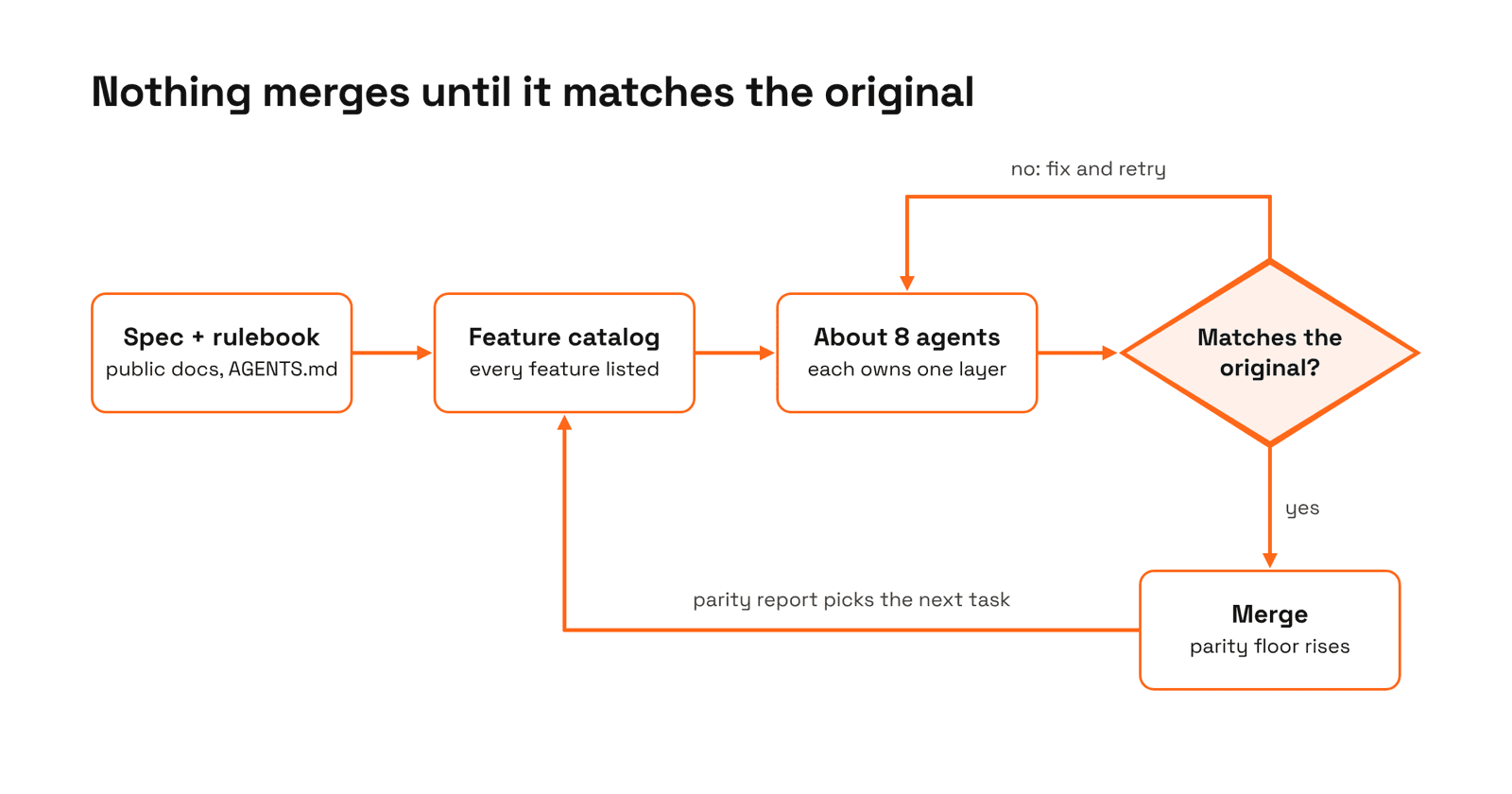
That loop is the whole idea. Nothing is kept because the AI says it's done. It's kept because it matches the real thing.
The seven steps
This playbook comes from the rulebook his agents work from, an AGENTS.md file that sits right next to the code. Here's what it shows.
Pick a target with a public spec
Choose software whose behaviour you can watch and whose files or formats are documented. If you can't describe what "correct" looks like, the AI can't hit it.
This is why Thomas went after Word and Photoshop rather than something obscure. Their file formats are published. Their behaviour is visible to anyone who opens them. Every question the agents have ("what should happen when I do this?") has an answer they can check.
Your version: pick a tool where you can say exactly what goes in and what should come out. "Our quote spreadsheet, with these inputs, produces this price" is a target. "Something better than our CRM" isn't.
Write the feature list
Use the original and list every screen, button and feature you need. This list is your definition of done, and it tells the AI what to build next.
He didn't say "build Word." He listed 405 features and let a script count what's missing. That turns a vague goal into a scoreboard. At any moment you can see what exists, what works, and what's next.
Your version: list every feature of the tool you're replacing, then build down the list. Be honest about which features you actually use. A shorter list you finish beats a long one you don't.
Write the rulebook before any code
One instruction file the AI reads at the start of every session: where to start, what it must never do (copy code, logos or wording), the quality rules, and when to stop and ask you.
The visible secret isn't a clever prompt. It's an AGENTS.md (with a CLAUDE.md beside it) that does four jobs. It tells each new session to read the current status and pick up the next task. It draws hard lines: in WordCraft's case, never crash and lose someone's work, and never use anything from Microsoft or Adobe. It sets the quality bar. And it says when to stop: only for decisions that are genuinely the owner's, like licensing, publishing or anything involving passwords.
That one file is why about eight agents can work unsupervised. Most people skip it and wonder why their agent drifts.
Split the build into independent parts
Break the software into pieces that don't depend on each other's insides, like file handling, the core engine and the interface. Each part can then be built separately without breaking the others.
WordCraft is split into layers: one handles measurements, one holds the document itself, one lays text out into pages, one reads and writes Word files, and the interface sits on top. An agent fixing page layout never has to touch the file reader.
There's a second design choice worth stealing. Every action in his apps is a named command, and every app ships an MCP server, a standard plug that lets AI agents operate the software directly. The clone isn't just a cheaper Word. It's a Word your agents can use.
Run agents in parallel, one task at a time
Give each agent its own part. It picks the next missing item from the feature list, builds it, and moves on. A progress file tells every new session what's done and what's next.
The progress file matters more than it sounds. AI agents don't remember yesterday. Every session starts from zero. A short status file is how the work carries on: the agent reads it, picks up where the last one stopped, and updates it before it finishes.
Test against the original, not the AI's opinion
Collect real inputs with known correct results from the original software. Every change runs through those tests, and nothing is kept unless it matches.
Never let the AI mark its own homework. An agent will happily tell you a feature is finished. The test that compares against the real thing is what kept Thomas's numbers honest.
Your version: a set of real inputs with known correct outputs, checked every time. Ten real invoices and what they should total. Twenty past jobs and the price you actually quoted. If the new tool doesn't match, it isn't done.
Ship early and measure honestly
Track how much of the feature list truly works, not just how much exists. Then release it and let real users find the gaps tests miss.
"Exists" and "works" are different numbers. A button that appears on screen but breaks on a messy real file counts as missing. Measure the second number, share it, and let the people using the tool tell you what the tests didn't.
The small-business version
You won't clone Photoshop this weekend, and neither did Thomas: he had 15 years of experience and a decade in the programming language he used. What you can steal is the architecture, and it works at any size.
Write the rulebook first. Where to start, what's forbidden, and when to stop and ask.
Define "done" as a list you can check. Every feature of the tool you're replacing, built down one at a time.
Never let the AI mark its own homework. Real inputs, known correct outputs, checked every time.
Build it so an AI can drive it. Named commands for every action, so your agents can use the tool as well as your team.
Where this breaks
Breadth is cheap. Depth isn't. Building the first version is the quick part. Getting it good enough to run your business on takes much longer.
A working screen isn't a finished tool. AI will give you every button quickly. Making each one handle the messy real-world cases your team throws at it is where the time goes. Even the high-profile clones cover only about a third of what a professional user needs.
Expect bugs your tests didn't catch. Your team will find problems in the first week that no checklist predicted. Plan for that week.
Budget for upkeep, not just the build. Software needs fixing, updating and backing up. Someone has to own that, and "the AI built it" isn't an owner.
Keep the old tool until the new one proves itself. Run both side by side for a month before you cancel the subscription.
The takeaway: AI cuts the cost of building. It doesn't remove the cost of running.
The legal line: "clean room" and where it gets murky
Copying what software does is generally fine. Copying how it looks or what it's made of is where trouble starts. (This isn't legal advice.)
Safe ground: a tool that does the same job, with your own design, your own name and your own wording.
Risky ground: copying logos, icons, templates, help text or the exact look of a branded product, or using a name close to theirs. Brands protect their look and name, even when your code is original.
Unsettled ground: whether AI-written code counts as truly original is still being debated, because the AI may have learned from the very software you're replacing. No court has settled it yet.
One more catch: in the US, purely AI-generated work may not be protected by copyright, according to the U.S. Copyright Office. You might not own what you built the way you'd expect.
The simple rule: build it for your own business, make it look like yours, and talk to a lawyer before you sell a lookalike of a named product.
The short version
- Brandon Thomas rebuilt seven Adobe apps and the three core Office apps with AI agents working from a single rulebook file (AGENTS.md) that says where to start, what's forbidden and when to stop and ask.
- The method has seven steps: a target with a public spec, a feature list, the rulebook, independent parts, agents in parallel, tests against the original, and honest measurement.
- The part that transfers to any business: define "done" as a checkable list, and never let the AI mark its own homework. Real inputs with known correct outputs decide what's finished.
The headline is that one person cloned big tech software. The more useful story is how ordinary the method is. A list of what "done" means. A rulebook. Work split into pieces. A test that doesn't care what the AI thinks. None of that needs Photoshop-sized ambition. It's how you'd want any tool in your business built, whether a person writes the code or an agent does.