How to install Claude's 15 small-business skills (the actual setup)
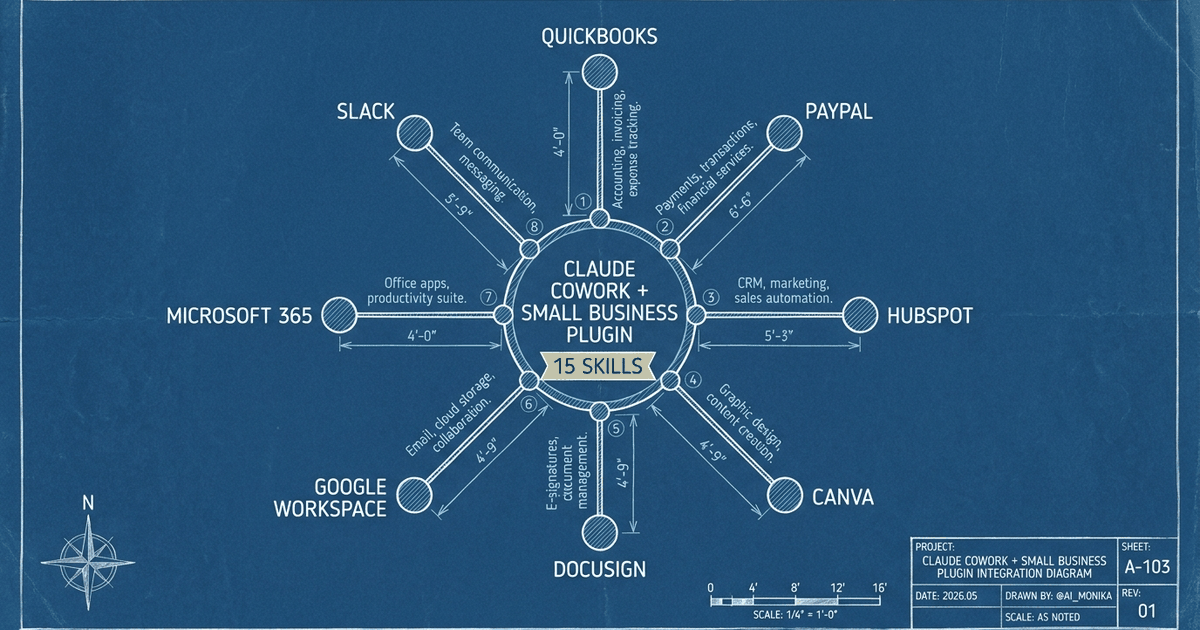
Anthropic just shipped a plugin that quietly replaces half your Zapier stack. On May 13, 2026, Anthropic launched Claude for Small Business: a plugin for Claude Cowork that bundles 15 ready-to-run workflows for things like chasing overdue invoices, planning payroll, closing the month, and triaging HubSpot leads. It connects directly to QuickBooks, PayPal, HubSpot, Canva, Docusign, Google Workspace, Microsoft 365, and Slack.
It is not a new pricing tier. If you already pay for Claude and have Cowork access, you can install it today. At the time of the most recent walkthrough I could verify, the plugin showed 423,000 downloads in the directory, second only to the design plugin. This workshop is the exact install path for the Small Business plugin in Cowork: how to wire connectors, run your first skill, and avoid the trap of half-configuring all fifteen.
Why this matters
The problem this removes: the Frankenstein automation stack. The Zap that breaks every six weeks. The Notion template you stopped updating in March. The three-tab dance every Monday morning to figure out who owes you money and which leads are hot.
Most small operators don't have an automation problem. They have a maintenance problem. Every active Zap is a small liability. Every connected app is a credential to rotate. Every template is a thing to remember to open.
The Small Business plugin shifts the cost structure. The skills sit dormant until you call one by name. The connectors are wired once. There's no schedule firing in the background trying to send something at 2am when your invoice numbering changes. You get the workflow when you ask for it, and not before.
If you've been waiting for a reason to delete six automations, this is the reason. Not because the plugin is magic. Because the plugin's design rewards focus, and your old stack rewarded sprawl.
What you're building
You're building a single operator surface inside the Claude desktop app: Cowork, pointed at a local working folder, with the Small Business plugin installed and two or three connectors wired to the tools you actually use this week.
A skill, per Anthropic's own docs, is a text file with detailed instructions for how Claude should complete a specific workflow. A plugin bundles skills plus connectors. The Small Business plugin equals 15 skills plus 8 connectors, installed as one unit.
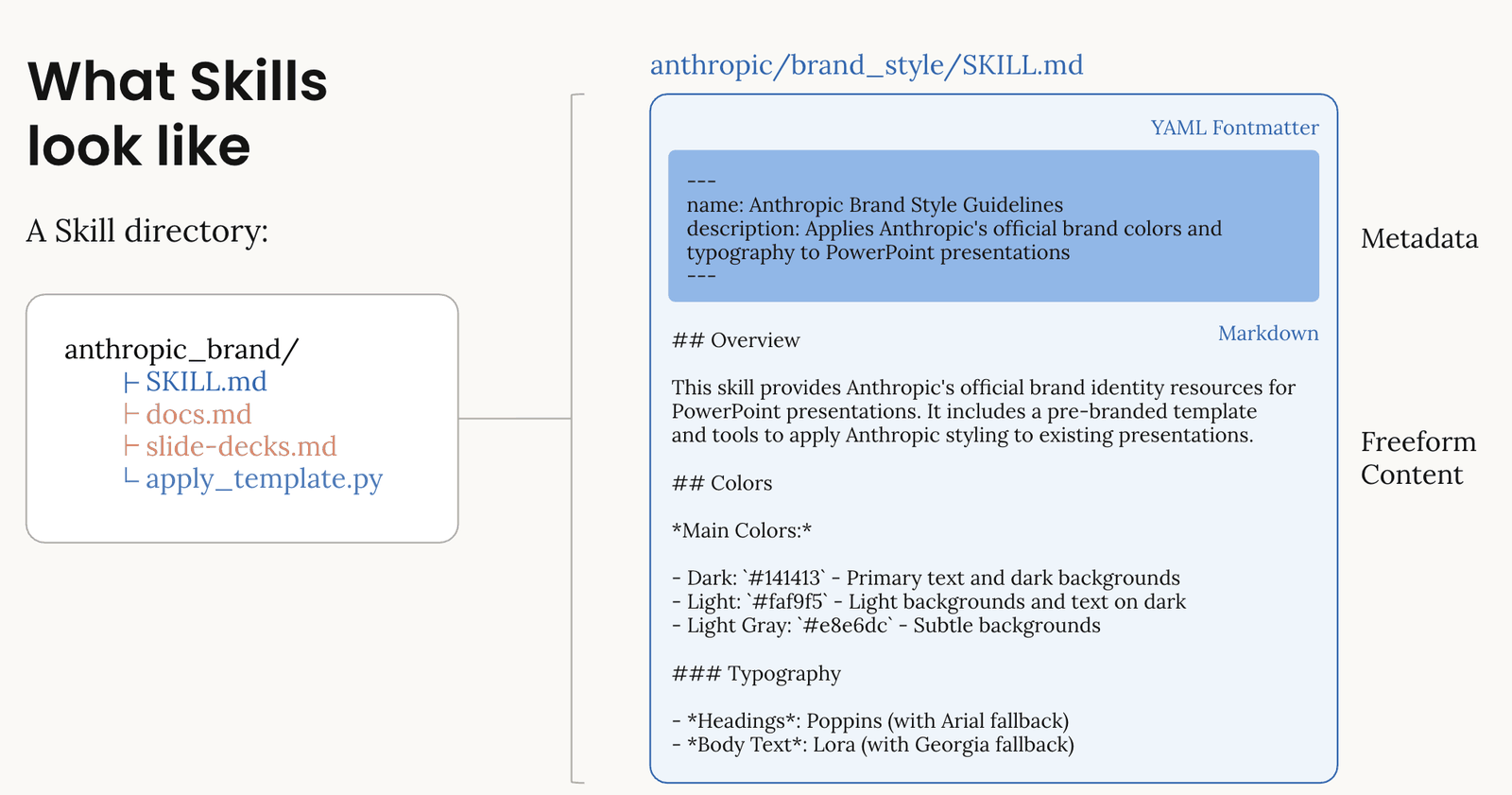
Think of it like a kitchen with 15 recipe cards taped inside a cabinet. You don't read all 15 every time you cook. You open the cabinet, pull the one you need, and the rest stay folded. That's the analogy for progressive disclosure, the architecture trick that makes this work. Claude reads only the metadata first (a tiny YAML header), then loads the full skill only when it's relevant, then loads any helper scripts only if that skill needs them.
Translation: installing 15 skills does not bloat your context window. You can have all 15 sitting there and only the one you invoke actually runs. In a Zapier-style stack, every active automation is a liability. Here, dormant skills cost you nothing.
What exists when you finish: Cowork open, plugin installed, the right connectors green, a CLAUDE.md file describing your business in your folder, and one skill run end-to-end on real data this week.
The walkthrough, step by step
Understand what a 'skill' actually is before you install anything
Before you click anything, internalize the model. A skill is a text file. A plugin is a bundle of skills plus the connectors they need. The Small Business plugin is 15 skills wrapped with 8 connector hooks.
The architecture matters because of progressive disclosure. Claude doesn't load all 15 skills into context every time you open a chat. It reads only the metadata first, then loads the full skill only when it's relevant to what you're doing, then loads any helper scripts only if that skill needs them.
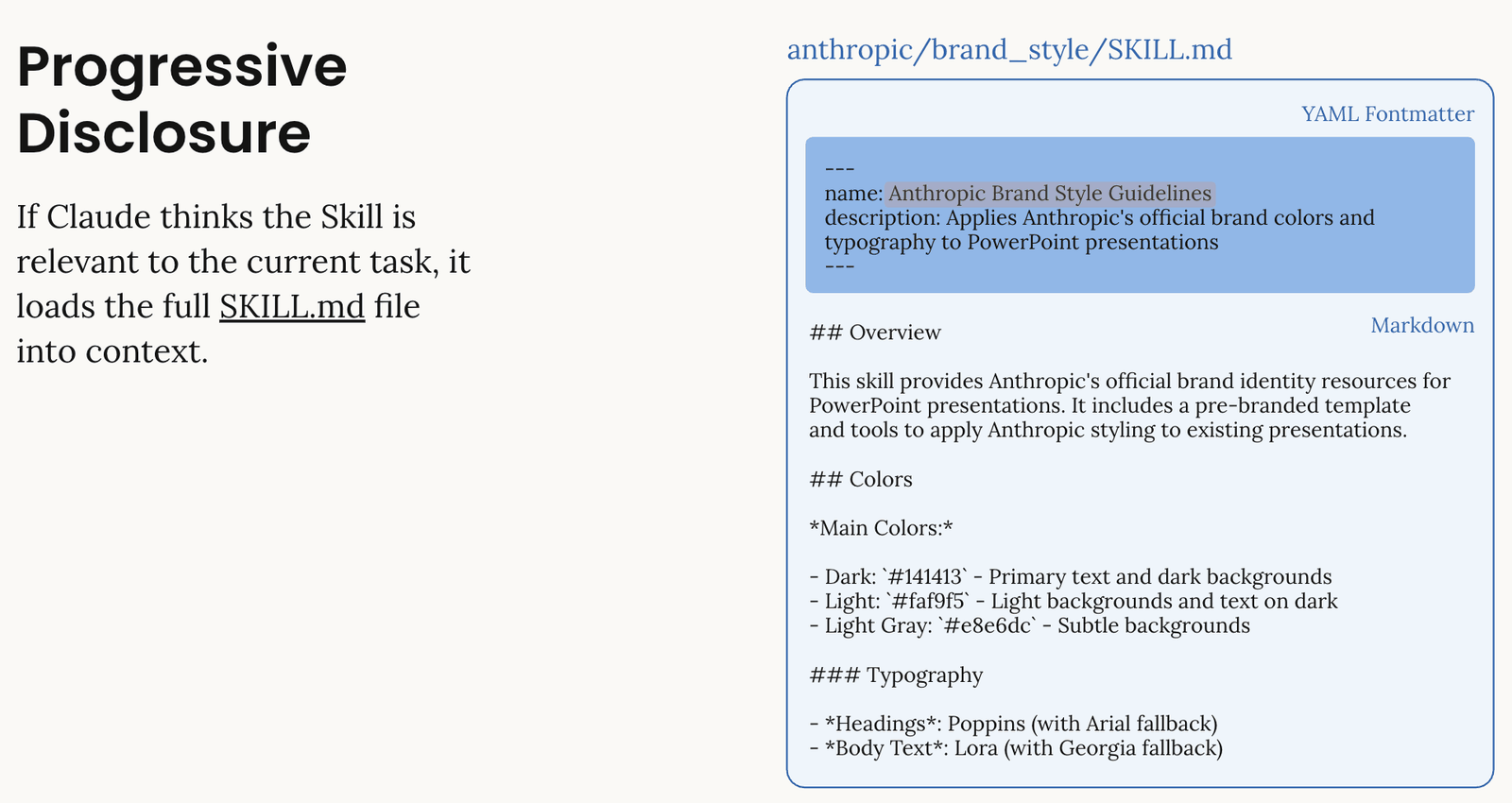
This is why the 'install everything, use a few' approach works here. Dormant skills cost you nothing. You're not paying a context-window tax for the 14 skills you don't run today.
Install the plugin (the exact menu path)
This lives in the desktop app, not Claude.ai in your browser. First-time gotcha: you cannot install Cowork plugins from the web chat.
- Download the Claude desktop app (Mac or Windows) and sign in.
- Switch from chat to Cowork: click the checklist icon in the left sidebar. Chat shows you a chat interface. Cowork shows you a task list. You want the task list.
- Connect a working folder: Cowork operates against a local folder on your computer. Pick an existing one (like your business ops folder) or create a new one. Skip this step and Cowork looks broken. It isn't. It just has nowhere to write.
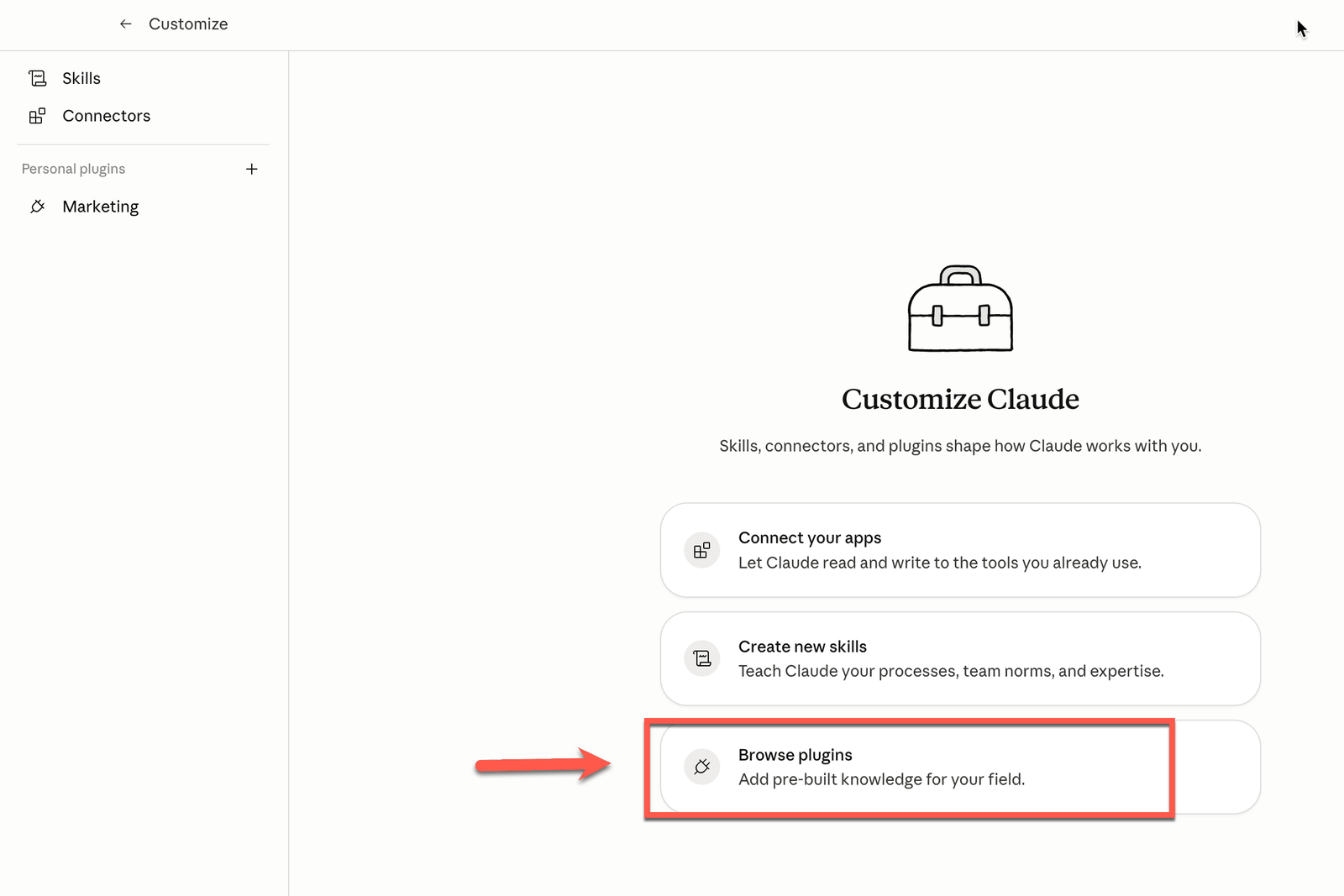
- Click Customize in the left sidebar. You'll see Skills, Connectors, and Personal Plugins.
- Click the + button, then Browse plugins. This opens Anthropic's plugin directory: productivity, design, marketing, legal, plus partner plugins like Figma, Zoom, Adobe.
- Find the Small Business plugin and install it. All 15 skills install together. There is no per-skill install.
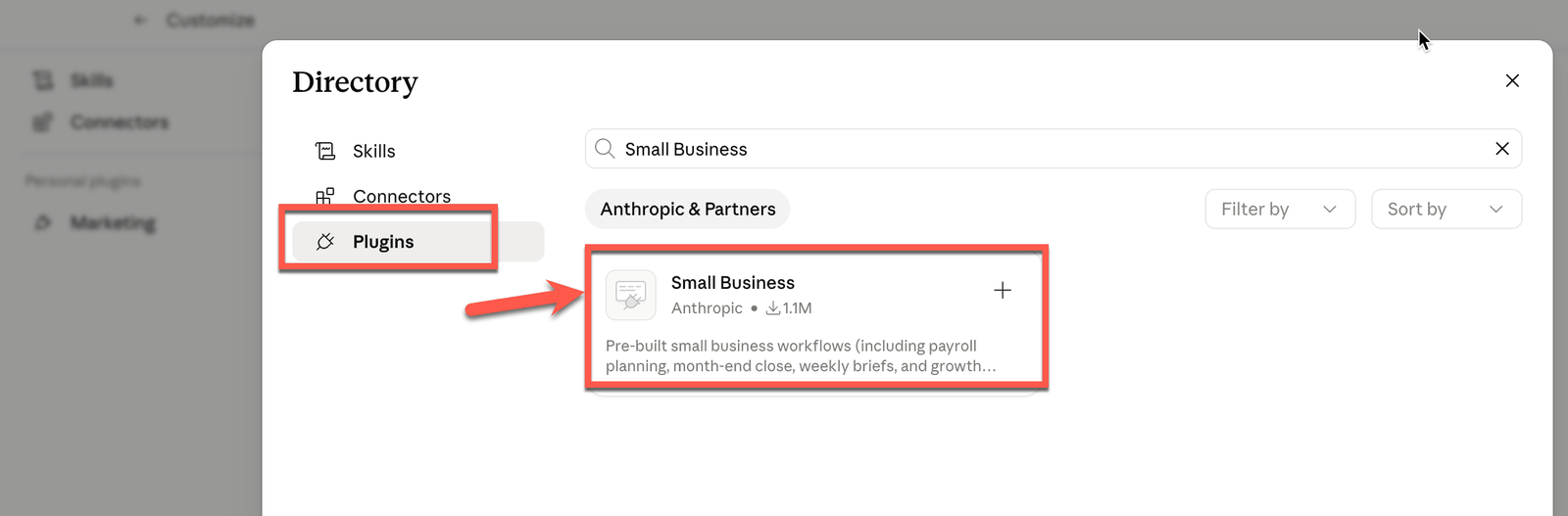
Wire up the connectors that match your actual stack
Eight integrations are supported at launch:
- QuickBooks: feeds the finance skills (cash flow, close month, margin analysis).
- PayPal: invoicing and payment status.
- HubSpot: CRM, lead triage, sales call lists.
- Canva: marketing campaign assets.
- Docusign: contract review and signing.
- Google Workspace / Microsoft 365: email, calendar, docs.
- Slack: notifications, summaries, internal posting.
You do not need all eight. Most skills still work with partial wiring. But the rule is brutal: a skill that depends on a connector you haven't wired up will deliver maybe 20% of its value. /lead-triage without HubSpot is a parlor trick. /cash-flow-snapshot without QuickBooks is asking Claude to guess.
Wire the two or three connectors that match the work you actually do this week. Add more later.
Run your first workflow as a slash command
Inside Cowork, you invoke a skill by typing / and the skill name. Documented examples from launch coverage:
/invoice-chase: sends tone-matched overdue reminders./cash-flow-snapshot: a 30/60/90-day forecast./plan-payroll: planning the next payroll run against current cash./close-month: reconciles and produces a month-end packet for your accountant./call-list: the day's top 5 sales calls based on HubSpot signals./lead-triage: scores HubSpot inbound.
A few more documented in the bundle: margin analysis, tax season prep, contract review pre-signing, employee onboarding, a Monday business pulse covering cash plus pipeline plus commitments.
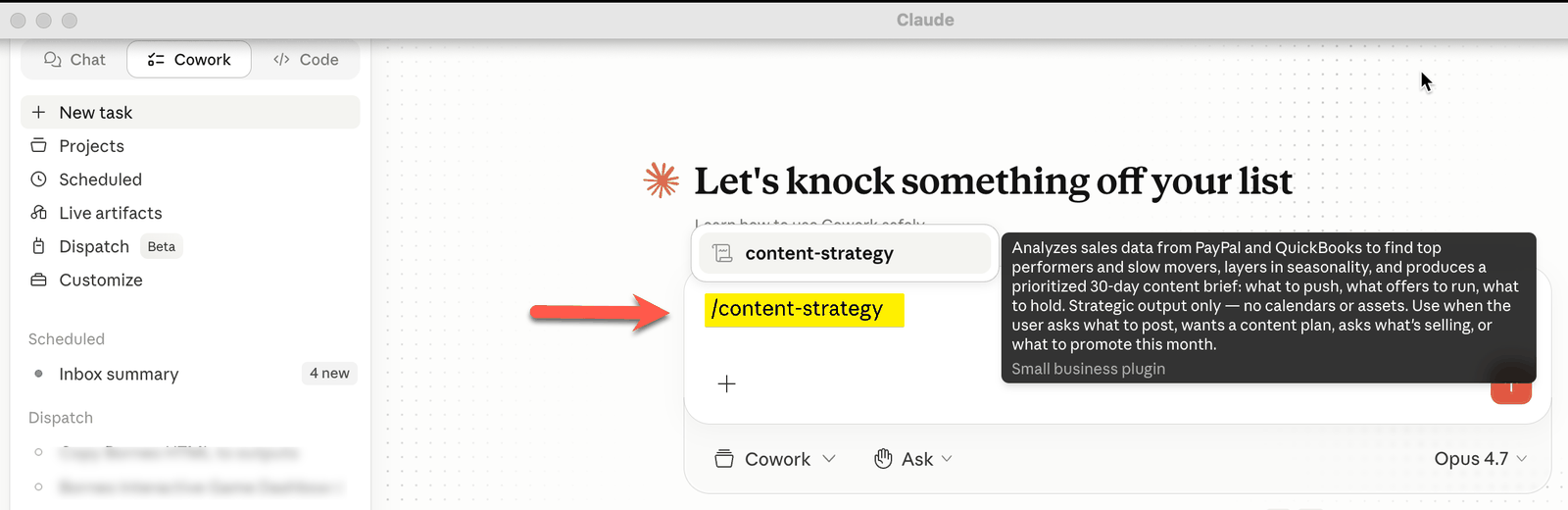
Quick caveat on the slash-command names: the spellings above come from creator documentation, not Anthropic's own published list. Open the plugin's skill list once installed and confirm the exact names in your directory before you build muscle memory.
Approve before anything sends, posts, or pays
This is the single most important behavior to internalize, and it's where people get it wrong.
Claude drafts the action. Then it waits for your explicit approval before it executes in the connected tool. Nothing sends, posts, or pays without you saying yes.
Which means:
/invoice-chasewrites the emails. You approve them, then they send via your Google Workspace.- A payment skill drafts the PayPal action. You approve it, then it runs.
- A Slack post is drafted, then waits.
This is the difference between an agent and an autonomous system. Anthropic chose agent. Treat it that way. Don't expect it to run finance jobs while you sleep. Do expect it to remove the 40 minutes of drafting every Friday afternoon.
The corollary: review the first three or four runs of any skill before you start rubber-stamping. The skill is reading your data and inferring tone. You want to catch the moment it says 'per my last email' to your largest customer.
Build a CLAUDE.md so every skill shares the same business context
This is the move most setup guides skip and it's the one that compounds. In your Cowork folder, create a file called CLAUDE.md. This is your business brain. Every skill reads from it. Put in:
- What the business does, in one paragraph.
- Who your customers are (segments, size, typical deal value).
- Your tone for external communication (formal? warm? blunt?).
- Financial baselines (typical monthly revenue range, payroll size, fiscal year end).
- Key people and roles.
- What you do NOT want Claude to do (e.g., 'never offer a discount over 10% without asking').
Now /invoice-chase writes in your voice. /cash-flow-snapshot knows what 'a bad month' looks like for you specifically. /call-list knows which lead segments matter.
Without CLAUDE.md, every skill is a stranger. With it, every skill is a coworker who's been there six months.
Worth noting: a creator post mentions an /smb-onboard slash command that walks new users through their first two connectors and runs a short business interview, storing context that other skills then use. Not officially documented by Anthropic, but if it shows up in your directory, run it before you write CLAUDE.md by hand.
What it actually replaces (and what to deploy first)
Don't try to deploy all 15 skills in week one. Even seasoned operators are likely to use under a quarter of them at any given time.
Map the skill to the pain. Some honest mappings based on the documented workflows:
- Replaces your overdue-invoice spreadsheet plus manual chase emails:
/invoice-chase. - Replaces the weekly cash flow check you keep forgetting to do:
/cash-flow-snapshotplus a Monday business pulse. - Replaces a chunk of the bookkeeper's monthly close ritual:
/close-monthplus tax prep. - Replaces the Monday morning 'who do I call today' anxiety:
/call-listplus/lead-triage. - Replaces a $30/month Zap that breaks every six weeks: pick whichever one of the above maps to it.
Pick one. Not three. One. The skills that compound fastest are the ones tied to a weekly ritual you already have. If you already check overdue invoices on Fridays, install /invoice-chase and use it this Friday. The habit is the install. The skill just makes the habit cheaper.
Where this breaks
Three failure modes show up in the first two weeks.
The Cowork-looks-broken trap. Symptom: you install the plugin, type a slash command, and nothing happens. The skill 'runs' but produces no output. Fix: you almost certainly skipped the working folder step. Cowork needs a local folder to write to. Without one, skills execute against nothing. Open Cowork, point it at a folder, retry.
The half-wired connector trap. Symptom: /cash-flow-snapshot produces a forecast that's confidently wrong, or /lead-triage ranks leads in an order that has no relationship to your pipeline reality. Fix: check which connector that skill depends on. If QuickBooks isn't wired, the finance skills are guessing from whatever scraps Claude finds in your folder. If HubSpot isn't wired, sales skills are inventing leads. Either wire the connector or stop running the skill until you do. Half-wired is worse than uninstalled because the output looks plausible.
The rubber-stamp trap. Symptom: three weeks in, a customer replies to an invoice chase email asking who the hell you think you are. Fix: you stopped reading the drafts. Claude inferred a tone from one snippy email in your sent folder and ran with it across your full A/R list. Approval gates exist for a reason. For any skill that talks to customers, keep the first 10 runs in slow mode: read each draft, edit one in five, and only then start trusting the pattern. The plugin doesn't know your largest customer is the one you absolutely cannot lose this quarter. CLAUDE.md helps. Reading the draft helps more.
The short version
- Claude for Small Business is a Cowork plugin that bundles 15 skills and 8 connectors (QuickBooks, PayPal, HubSpot, Canva, Docusign, Google Workspace, Microsoft 365, Slack), installed as one unit from the desktop app's plugin directory.
- Progressive disclosure means installing 15 skills does not bloat your context window: Claude reads metadata first and only loads a skill when you invoke it by slash command.
- The operators who get value treat it as 'one skill, deployed well' instead of 'fifteen skills, all half-configured': wire the one connector that matches this week's pain, write a CLAUDE.md, and run one skill on a real ritual you already have.
The interesting thing about this plugin isn't the 15 skills. It's that Anthropic shipped a small-business product at all, with an agent-not-autonomous default and an approval gate in front of every action. That's a statement about where they think the line should sit between AI doing the work and a human owning the work. If you've been waiting for permission to delete six brittle Zaps and replace them with one skill you trust enough to run weekly, this is the permission. Install once. Wire narrow. Read the first drafts. Let the dormant skills sit dormant. The plugin's design rewards focus. Reward yourself the same way.